BILT Speaker

BILT Speaker
RevitCat - Revit Consultant
Showing posts with label RTC. Show all posts

Saturday, 1 June 2019

20th Time Presenting at RTC / BILT Conferences

RTC 2014 - Pump Up the Volume - Competition Entry

Last year this blog reached a milestone of 1 Million views.

This year I reached another milestone: Presenting at my 20th RTC / BILT Conference on various Revit topics.  At several of the conferences I did multiple presentations, so the actual total is more than 20.

For the record, here is a list of :
RTC & BILT conferences over the years:

RTC (Revit Technology Conference) grew out the Sydney Revit user group, started by Wesley Benn.  The first conference was organised by RUGS (Revit User Group, Sydney - the longest running Revit user group in the world).  As the conferences went from strength to strength, they were run by a company RTC Events, which has now morphed into DBEI (Digital Built Environment Institute).

RTC 2005 - Blue Mountains (West of Sydney), NSW, Australia 

The inaugural conference.
  • I missed this one, sadly.

RTC 2006 - Shoal Bay (North of Sydney), NSW, Australia

  • Attended as a delegate only - and learnt a huge amount about Revit.

RTC 2007 - Roadshow event held in Sydney, Brisbane, Melbourne, Perth (Australia) & Auckland (New Zealand)

  • 1.  I presented at the Sydney event: "Documentation in Revit"

RTC 2008 - Brighton Beach, Sydney,  Australia

  • 2.  Presented: "Revit Architecture - Advanced Modelling"

RTC 2009 - Albert Park, Melbourne,  Australia

  • Attended as a delegate only - the first year of having to submit abstracts (which I failed to do)

RTC 2010 - Manly Beach, Sydney,  Australia

RTC 2011 (Australasia) - Broadbeach, Gold Coast, QLD,  Australia

RTC 2011 (North America) - Huntington Beach, California, USA (NE of Sydney)

Inaugural North American conference
  • 5.  Presented: "Designing in Revit Using Parametric Formulas"

RTC 2012 (Australasia) - Northbeach, Wollongong (South of Sydney), NSW,  Australia

RTC 2012 (North America) - Stone Mountain, Alanta, Georgia, USA


RTC 2013 (Australasia) - Auckland, New Zealand (East of Sydney)


RTC 2013 (North America) - Bayshore, Vancouver, Canada


RTC 2013 (Europe) - Delft, The Netherlands

Inaugural European conference- one of my favourite venues/events


RTC 2014 (Australasia) - Albert Park, Melbourne,  Australia


RTC 2014 (North America) - Schaumburg (West of Chicago), Illinois, USA

RTC 2014 (Europe) - Dublin, Ireland

  • First international conference I missed

RTC 2015 (Australasia) - Broadbeach, Gold Coast, QLD,  Australia

RTC 2015 (Asia) - Sentosa Island, Singapore

Inaugural Asian conference

RTC 2015 (North America) - Washington DC, USA

  • Missed this one - 4 events in one year would be too much!

RTC 2015 (Europe) - Budapest, Hungary


RTC 2016 (Australasia) - Hunter Valley (North of Sydney), NSW,  Australia

  • Attended as a one-day delegate (taking a break due to presenter burn-out)

RTC 2016 (North America) - Kierland Resort and Spa, Scottsdale, Arizona, USA


RTC 2016 (Europe) - Porto, Portugal

  • Missed this one


RTC to BILT


In 2017, the name RTC was changed to BILT - as the conferences were no longer restricted to Revit

BILT 2017 (Asia) - Singapore

  • Missed this one

BILT ANZ 2017 - Adelaide, SA (West of Sydney),  Australia

  • 17.  Presented: "Power to the People - Global Parameters New Revit Feature"

BILT 2017 (North America) - Harbour Castle, Toronto, Canada

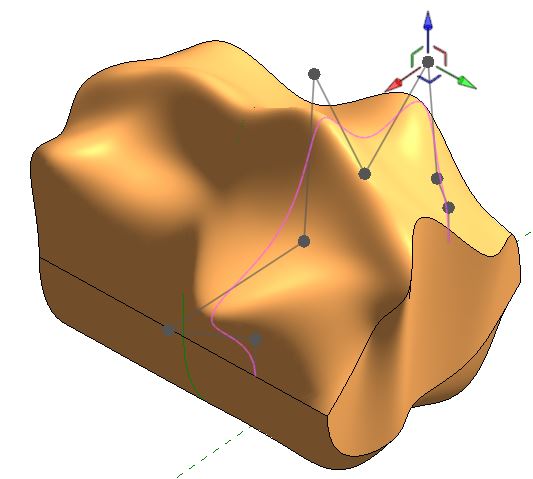
  • 18.  Presented: "Create Good Looking Organic Nurby Revit Content" - Massing in Revit

BILT 2017 (Europe) - Aarhus, Denmark

  • Missed this one

BILT 2018 (Asia) - Singapore

  • Missed this one

BILT ANZ 2018 - Fortitude Valley, Brisbane (North of Sydney),  Australia

BILT 2018 (North America) -St Louis, Missouri, USA

  • Missed this one

BILT 2018 (Europe) - Ljubljana, Slovenia, Denmark

  • Missed this one

BILT ANZ 2019 - South Bank, Melbourne, Vic (South of Sydney), Australia

  • 20.  Presented: "Choosing Standards from 50 Ways to Do That in Revit"


 Anyone notice a theme in the locations?  Beaches, parks, islands, bays, valleys . . . .

*NB. This list does not include the various ancillary events such as 'Data Days', DTS, BCS etc

Saturday, 5 May 2018

Revit Nurby Forms at BILT ANZ 2018 in Brisbane


I am looking forward to the next BILT ANZ Conference in Brisbane on 24 - 26 May 2018, where I will be presenting a session on creating 'Nurby Forms in Revit' - ie. creating complex forms with NURBS surfaces (double-curved), which are notoriously difficult in the Revit Conceptual Massing Environment.

In this session I will start by looking at using the Conceptual Massing Environment to create the equivalent traditional Revit 3D forms (Extrusion, Revolve, Sweep, Blend, Swept Blend), and examining the subtleties of different methods.  This will inform the next stage of creating sinuous forms in Revit, and the workarounds you'll need to overcome some of Revit's limitations.  Then I will demonstrate some techniques for creating parametric NURBS forms that you would not expect Revit to be able to handle.  Finally I will look at how to make these forms look better, as Revit is not good at displaying NURBS.  All this will be done without using any API, Dynamo or Add-ins of any kind.


Hope to see you at BILT in Brisbane for my session:  #1.3 'Create Good Looking Organic Nurby Revit Content' at 1.45 on Thursday 24th May 2018.


Wednesday, 1 February 2017

Gare do Oriente - Nested Revit Repeaters - part 1

In 2013 I presented a paper titled "Fractal Fun with Revit Repeaters and Adaptive Components" at three RTC events in Auckland, Vancouver and at the inaugural European Revit conference in Delft, in the Netherlands.  Part of the presentation involved a live demonstration of how to construct a parametric Revit model of the roof of the Gare do Oriente railway station in Lisbon, designed by Santiago Calatrava.

Gare do Oriente by Santiago Calatrava

Since then I have had a number of people asking me how it was done - it was of course described in step-by-step detail in the RTC handouts.  Those are not so easily accessible now, so I am posting the content here, in stages.  Part 1 involves creating a rig for one of the structural supports of the roof.


I will not show a step-by-step guide here as the process is described in a video tutorial:
here is a youtube link


As a reminder, below is a list of the steps required in the process:

  • Start a new Adaptive Component
  • Place a point at the origin (X,Y,Z = 0)
  • Make it adaptive
  • Make its 'Show reference planes' property to 'Always' visible
  • Set the workplane as the horizontal reference plane of the adaptive point
  • Place another point on top of the adaptive point
  • Move it up in the Z direction
  • Associate its 'Offset' property to a parameter 'Height' (NB. it will only have an Offset property if it is correctly hosted on the horizontal reference plane of the adaptive point)
  • Draw a reference line from the top point down to the adaptive point, making sure 3D snapping is on (Options toolbar)
  • Place two more points, both hosted on the reference line
  • Make the upper line-hosted point always show reference planes
  • Change its Measurement Type to 'Chord Length' or 'Segment Length' (NB. because the host is a straight line, in this case Segment length is the same as chord length, which just means direct distance)
Hosted point Measurement Type
  • Associate its 'Chord length' to a parameter called 'Perimeter Drop'
  • Change the Measurement Type of the lower hosted point to 'Chord Length' or 'Segment Length'
  • Associate its 'Chord length' property to a parameter called 'Valley Drop'
  • Flex the parameters to test the rig thus far;  move the adaptive point to check everything else is hosted to it
Circles to host geometry
  • Set the workplane as the horizontal reference plane of the top point
  • Place a reference circle centred on the point
  • Make its temporary radius dimension into an actual dimension
  • Associate the radius dimension to a parameter called 'Radius outside'
  • Set the workplane as the reference plane of the upper hosted point
  • Place a reference circle centred on the point
  • Make its temporary radius dimension into an actual dimension
  • Associate the radius dimension to a parameter called 'Radius inside'
  • Create a formula for 'Radius outside' = Radius inside * 1.4142
Divide Path
  • Select the top circle
  • Click on the 'Divide Path' icon
  • Set the number of points to 8
  • Select the lower circle
  • Click on the 'Divide Path' icon
  • Set the number of points to 8
The basic rig is now complete, ready for adaptive components and repeaters to be hosted on it.  These will be covered in following tutorials.

Step 5  Assembling the Array of Structural Columns

Friday, 1 July 2016

Power to the People - Global Parameters at RTC NA 2016

Here is a sneak preview of my upcoming presentation on  Global Parameters - "Power to the People" (Session 1.4 at 3.15pm) at RTC NA in Scottsdale, Arizona on 14 July 2016

This will be a presentation on how Global Parameters work, and how to use them for computational design - no Dynamo, API or any third party software involved - just 100% Revit 2017 and some brainpower:


View on Youtube

Wednesday, 30 December 2015

Revit Octopus - RTC 2012 NA Competition Winner

Octopus Hotel, Hainan
Back in 2012 this drawing was the Innovation category competition winner at RTC North America (Atlanta).  It was meant to represent the design process (on yellow trace paper and in Revit) of the Octopus Hotel designed by PTW in their Shanghai office.  The initial design modelling was done in Sketchup and 3D Max, then 2D documented in Autocad.  Then we had to start really documenting it in Revit to make sure the organic shapes were buildable. . . . .
The first task to solve was the plan layout - making sure that each hotel wing (octopus leg) had regular radius curves with smooth transitions between concave and convex curves, with a minimum number of different shaped hotel rooms.  Trying to do that in 2D was painful - lots of reference planes/lines and aligning centre-points of arcs with each other, and plenty of calculations.  If anyone made a change to the layout you had to start all over again.
To improve this process in Revit, I decided to make a flexible component that would place a number of tapered hotel rooms along an arc.  Initially I tried a line-based generic component that required the user to click a start and end point - that worked fine for linear hotel rooms.
As soon as I tried radial arrays, it became a nightmare, as they are really hard to control with parameters.  As adaptive components had recently been introduced to Revit, that seemed to be the way to go - but then I realised that they do not allow the Array command.  'Repeaters' to the rescue!
All of this required a lot of complex fomulas and trigonometry, even with using Repeaters - particularly as I wanted the end user to be able to dynamically change and schedule room areas, widths and the radius.


Area calculations for segments
Eventually I managed to create an adaptive component that had two curves (concave and convex), forming a corridor double loaded with rooms.  This was fully parametric in terms of being able to stretch the start and end points and change the two radii as well as critical room dimensions.

 
This would have made the design process so much easier than relying on several different programs and yellow trace paper!  Creation of this component was fully documented in my handout for the RTC events in 2012 (Australasia and North America).  When I get a chance I will try to post some of the techniques on this blog.


The 2d planning was only the start of the challenges - each hotel room had a balcony that had curves in plan and in elevation, so that really challenged Revit's ability to create organic geometry - but we did succeed in building a convincing 3D model in Revit.

Octopus hotel wing


Of course, now you might be tempted to use Dynamo to build this sort of complex geometry.

Wednesday, 4 November 2015

RTC Europe 2015 - Revit goes to Budapest

Danube from Pest Castle

RTC Europe is over for another year. The 'Revit Technology Conference' concept is broadening its horizons - it is now all about BIM, not exclusively Revit. This year the event was held in Budapest - the home of Archicad.  Graphisoft were very much in evidence at the event, what with sponsorship and organising tours and competitions.  I think this is a very healthy thing for the industry.  Autodesk and Revit need some effective competition otherwise they will stagnate.

As always, I learned a few more tricks about Revit - in fact quite a few more than normal this time, so this was a very fruitful conference.  We also saw a number of interesting new products on show, such as Enscape, Fuzor and Avail, along with established ones like the Ideate Revit add-ins and CAD Learning - the latter were doing a wonderful job of organising free Revit certification at the conference.

Corinthia Hotel, Budapest

What a spectacular venue for a conference:
Corinthia Hotel Atrium

Stairway to RTC, Corinthia Hotel

Grand ballroom, Corinthia Hotel - main RTC venue

Site Visit to Graphisoft Park

The day before the conference started, a few people went on a tour of Graphisoft Park, outside the centre of Budapest.  We had a guided tour around the technology park set up by the owners of Graphisoft in order to create a good working environment for the Archicad programmers (amongst others).  The park was created on the site of old gasworks, and some of the old buildings were refurbished.

Gasworks Towers at Graphisoft Park
Graphisoft Park, Budapest

Graphisoft Headquarters, Budapest

Original specs on first Mac used for Archicad

Pecha Kucha

This sounds like a Hungarian invention but was actually started in Japan - it is a presentation competition.  Each competitor has 20 Powerpoint slides and 20 seconds to speak on each one.  The inaugural Pecha Kucha event at RTC, sponsored by Graphisoft, was won by Joe Banks of Brisbane, Australia - that means free attendance for him at the next European RTC in Porto, Portugal in October 2016.


Shopping in Budapest

Knockdown sale on Vasari?
Retro mobile phone shop