BILT Speaker

BILT Speaker
RevitCat - Revit Consultant
Showing posts with label array. Show all posts

Saturday, 26 February 2022

Poor Man's Array in Revit

There are several situations in Revit where the Array tool is not available - one of those is when using the Sketch commands.  Here is a quick workaround.

Stair Sketch Example

In this example I wanted to create a stepped side to a stair in the sketch mode.


When I selected two of the stepped boundary lines, I discovered to my horror that the Array tool is greyed out.

Workaround

Instead of using the Array tool, use the Copy tool, making sure that the 'Multiple' setting is ticked on the Options Bar

Revit first asks for the Start Point

Make sure to snap to the first end point of one of the items being copied

Then snap to the second end point

Then snap to the third end point - being the end of the first copy

Keep snapping to the end of the most recent copy until you have created your array - it is pretty quick once you get going.
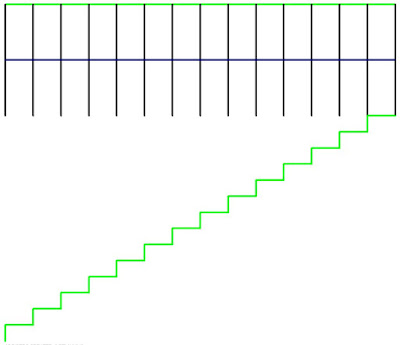
In this example I had to delete the last created line

If you need a lot of copies - say 100, you have two choices:

  • Concentrate hard and try not to fall asleep
    or
  • Make 20 copies then stop and select all 20 steps;  copy those 5 times

Array Done!

I figured this trick out many years ago, and I needed it to achieve the stepped side to a stair sketch for another blog post - so I thought I'd document it in case it helps someone out there.

This might get you thinking about other uses of this simple technique.

I tried it for radial arrays, for which you would need to use the Rotate tool - but unfortunately that tool does not allow multiple copies.


Sunday, 28 July 2019

Arrays in Revit Global Parameters

Continuing with the theme of  Global Parameters in Revit . . . . .

Global Parameters and Arrays


Global parameters do not directly support arrays – you cannot associate a parameter to an array number in a model (unlike the ability to do so in the family editor).

When you select an array number in a project, have a look at the Options Bar - there is no label for you to associate a global parameter.


In the family editor, when you select an array number - there is a label on the Options Bar for you to associate a family  parameter to the array number.


Workaround


To work around this Global Parameter limitation, you need to build the array into an external family:
  • The family needs to have an integer instance parameter - this can be created directly when associating the array number (or created prior).
  • The array could consist of nested families or arrayed elements - it is usually much easier to control the array when it is a nested family, but that may slow response times if there are too many levels of nesting.
  • If you need to be able to schedule, tag or select individual families in the project (from the array), then the nested family should be 'Shared'.

  • Once you have associated the array number to a controlling parameter, it is wise to use that as a check parameter, to prevent users from inputting a value of less than 2 - because this would break the array.
  • You need to then create a User Input parameter, which is the one used in the project.
  • The check parameter is then driven by the User Input array number, with a check formula in place to prevent an input less than 2

  • Load the family into project then its instance property (Array Number) can be associated to a global parameter.

Once this is set up, your nested family array should be driven by Global Parameters in the project.

If you would like Autodesk to fix this annoying limitation, please go to Revit Ideas to vote:

Enable global parameters to associate to Array Numbers


Tuesday, 6 June 2017

Global Parameters Enhancement Wishlist - Revit Ideas

All my recent research work on Global Parameters has created a list of enhancement requests.  Although a lot of new global parameter features were released with Revit 2017, we only had one enhancement and one bug fix in v2018:
  • Associate global parameters to Radius and Diameter dimensions (2018)
  • Global parameters vs Equals dimension conflict removed (bugfix 2018)
Here is my list of enhancement requests, plus a few other ideas from other people already on the wishlist - please vote for them if you'd like these to be fixed:


Enable global parameters to associate to Array Numbers

Enable creation of an Area Reporting Parameter for use in Global Parameters

Enable global parameters to associate to Floor ‘Height Offset from Level’ system property

Allow association of global parameters to material properties of system families 

Allow access to Global parameter of linked model

Allow the use of Shared Parameters in Global Parameters

While we are on the subject of shared parameters, I really really wish we could use them in Key Schedules so please vote that up too.

Ability to "Paint" using a Global [material] Parameter

Please note that requests to enable us to associate global parameters to ALL system parameters will probably not get far because each and every one has to be programmed separately, so it is better to create a wishlist item for each parameter that you want access to (frustrating, I know).

Monday, 11 January 2016

Weird Stair Stuff part 7 - No Array in Sketch by Component

Here is yet another crazy inconsistency and limitation in the Revit stair tool:
If you use the Stair by Component Sketch tool, it does not automatically create all the riser lines for you (unlike the old sketch tool).  So you need to create one riser and then array it.  But the Array tool is not available in sketch mode, just when you need it most !!!!
Greyed out array icon

Workarounds

Here are my workarounds - not that it gives the Factory any excuse for not fixing this:

1.   Convert to Sketch
  •  Use the Run Tool
  •  Select the run and convert it to a sketch
2.   Multiple Copies
  • Place two risers at the spacing you need
  • Select the second one
  • Click on the Copy icon

  • Make sure it is set to 'Multiple Copies'
  • Snap to the endpoint of the first riser (not the one you are copying)
  • Snap to the end of the second line (that you are copying)
  • It will place a third riser at the same spacing
  • Snap to it and it places a fourth one
  • Keep going until you have your 'poor man's array'.
  • Then log in to the Autodesk website and register a fault that needs to be fixed


Link to Stair Index Page

Thursday, 6 March 2014

Revit Repeaters Index Page


When Revit v2013 was released it gave us the first version of a great new feature:  Repeater.  Repeaters are an alternative way of creating arrays in Revit, but they only work in the conceptual massing environment (Adaptive Components and Massing) where the tradional Revit array tool is not available.

I presented a paper on the topic "Divide and Conquer: Adaptive Components in Revit 2013"  at Revit Technology Conferences in May 2012 (Wollongong, NSW), June 2012 (Atlanta, USA).  When I submitted the abstract v2013 had not been released so I wasn't able to use the word "Repeater" in the title!  I followed this up with further presentations at RTC in 2013: "Fractal Fun with Revit Repeaters" - May 2013 in Auckland, July 2013 in Vancouver and September 2013 in Delft (Netherlands).  In the process of researching these topics I have tried to explore the capabilities and also to uncover the mysterious rules of Repeaters.  I have written a number of blog posts on the subject, so it might be useful to list those here.

Revit Repeater Index

Repeater Theory
Fun Examples

Adaptive Components Index

Adaptive components are a vital part of Repeaters, so here are a few posts on them as background:


Before Repeaters - Traditional Revit Arrays