BILT Speaker

BILT Speaker
RevitCat - Revit Consultant
Showing posts with label order. Show all posts

Sunday, 20 May 2018

Revit Ideas Wishlist Voting

Autodesk created the 'Revit Ideas Wishlist' a while back - yes I know it is flawed and has a lot of rubbish on it.  However, I know that the Revit Product Managers do actually look at it and monitor the votes.  It is not the only thing that decides what goes into future Revit upgrades but it contributes to the discussion - so I like to support it, in particular the sensible ideas that are posted on it.

I do believe that we should mainly be voting for things to be done to the core software that cannot be done by API, Dynamo or Add-ins - as those things can be done quickly by others (or yourselves).

Here are some of the better ones that I think should be voted up (including some that I have posted):

Please go to the Revit Ideas forum and vote for any of these ideas that you agree with:

Model Stability (& Pins)


Allow us to change 2D extents of pinned sections - just like we can for grids and levels.  Then we could leave those sections pinned all the time and not risk losing attached annotation.

Persistent Pins - pins that reinstate themselves after you have modified the element once

Parameters


#1 wish regarding parameters is to allow Shared Parameters in Key Schedules  - this would unlock so much potential in Revit, and the API just can't get in there to solve it.

There are several outstanding Global parameter requirements:

The first is oh so simple, but would be a huge deal for us:
Enable global parameters to associate to Floor ‘Height Offset from Level’ system property

Enable global parameters to associate to Array Numbers

Enable creation of an Area Reporting Parameter for use in Global Parameters

For more detail  refer to Global Parameter wishes


Stairs & Railings


There are so many things that need to be fixed on stairs and railings, that I have created a list of requests just for Stairs and Railings.

There are a couple of basic ones that just need to be done to improve stair arrows - not much more than bug fixes:


Families

Are you intensely irritated by the default setting for face-based family placement being 'Place on Vertical Face'?  I think that 99+% of users would like it to be changed (not to mention BIM managers who have to deal with confused users not understanding why they can't place ceiling fittings).
Vote her to  make the default 'Place on Face'


Form Creation

Creating forms in the Conceptual Massing Environment is fraught with problems - some of them could be alleviated by the following two capabilities:

Control profile order during form creation

Select Path during form creation

There are oh so many more things that need to be fixed in Revit - but since Autodesk concentrate on such a few, we need to target which ones would genuinely benefit the most people.  And we shouldn't ask Autodesk to spend time on things that can be done by some other means (API, Dynamo etc).

Have a look at the latest updates to the Autodesk Revit development roadmap to see what is planned or has been recently delivered.

Wednesday, 29 June 2016

Postscript to Parameter Grouping in Revit

Following my earlier post on the sort order of parameter grouping, here is another weird sort order issue:

There is a grouping that exists in the family editor (not in Global Parameters) called "Analytical Properties".  I am not sure if it exists for all categories but it is there for Windows.  However, it is not available for us to use - it does not show in the grouping list when creating a new parameter.  It is populated with some built-in (system) parameters that we cannot change, although the alphabetic sort order does work on the parameters within the group, as does the Move Up/Down function.

There is a small hint of alphabeticality about it though:  it does slot in just below 'Analytical Model', even if above 'Analytical Alignment'.

Wednesday, 22 June 2016

Revit 2017 Global Parameter Grouping Titles

Working with global parameters in v2017 has quite a number of advantages over doing so in Revit 2016 R2.  One of those is the ability to assign global parameters to groupings so that they are segregated in the Global Parameter dialog box under each grouping title - much the same as we can do with parameters in the family editor.
In the family editor this is really important because when you load the family into a project, those groupings are visible in the properties dialog - and the parameters more or less stay where you put them * 
(* there is a bug such that sometimes it does not move them to the desired grouping in a project even if you change them in the family editor and reload).

Global Parameter Grouping

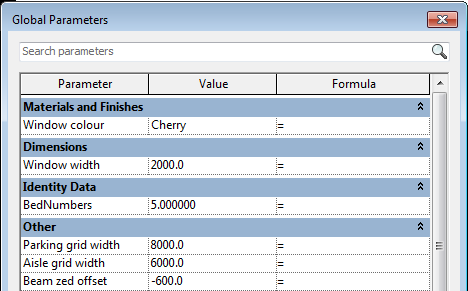
With Global Parameters, you only ever see the grouping when you open the dialog box;  when associating properties to Global Parameters you just see an alphabetic list of the appropriate parameter type (Length, text, number etc).  When you have a lot of Global Parameters in a project it is handy to use the grouping to organise your parameters into related items - you may have numerous groups of different parameters doing completely unrelated tasks, and they all get jumbled up, making it hard to track a particular operation or sequence of formulas.

I have taken to using these groupings for purposes unrelated to the actual titles, in much the same way that people often use 'Other' to hide calculations in the family editor because it is always last on the properties dialog box.  You cannot rename the groupings - they are hard-coded into Revit;  nor can you change the order of them.  And what a strange order they are in!

After a while I got fed up with assigning global parameters to a particular grouping and finding them jump way up or down the list in a totally unpredictable way.  Anyone remember the 'jumping lechrechaun' ribbon when it first came out in v2010?  Well it isn't quite that bad, but is annoying.  So I decided to document the order of the grouping titles, so I would have some chance of anticipating the location when assigned to particular groups - and here it is:

And how logical is that? 
  • It isn't alphabetical
  • It isn't discipline related
  • It isn't logical
But what I do know is that Constraints and Construction remain at the top, as the always have;  'Other' remains firmly at the end, which will be comforting to many people.  I find it disturbing that 'Dimensions' is languishing down in 20th spot; and as for 'Rebar Set', how did that muscle its way into third spot?
Visibility is way down near the end, as befits its alphabetic status - much the same as I was always close to last for anything at school, with a 'W' surname.   But Visibility is actually a useful grouping, that I'd like to make more use of (in the family editor too), but since it is at the end, users are unlikely to ever find it.

Oh well, at least I now have this list to help me predict where the parameters will jump to.  I hope it helps other Revit users out there too.