BILT Speaker

BILT Speaker
RevitCat - Revit Consultant
Showing posts with label version. Show all posts

Saturday, 25 December 2021

Upgrading to Revit 2022 and Windows 10

Way back in 2016 I posted about my dislike of Windows 10 (not to mention 8 and 8.1 which I thought were diabolical).  I resisted upgrading from Windows 7 for several more years - even after Microsoft ceased support for that version.  Many IT Managers around the world followed the same strategy until official support stopped - whereupon they were forced to move to Windows 10.

My reasons for disliking Windows 10 were nothing to do with "resisting change" - after all I have been an avid beta tester of Revit for many years, and usually installed new versions within hours of release (well, maybe not for use on live projects . . . , as that might be considered foolhardy).  I had genuine reasons for criticising Windows 10 - which I won't describe here, as it is now past history.

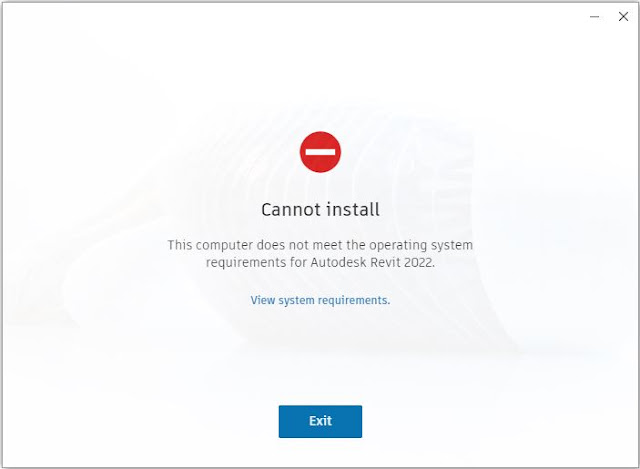
Revit 2022 on Windows 7

This year, Autodesk forced the issue:

Not only did Autodesk cease to support Windows 7 but they actively prevented me from installing Revit 2022.

Well, I knew it was going to happen some day - in fact I was surprised to be able to keep Windows 7 running for so many years.

Time to bite the bullet and upgrade.  In the end, I decided that it was also time for a new laptop - and it would be simpler to buy a new Windows 10 computer to install and run Revit 2022 and later versions.

For the record, I still don't like Windows 10 even after becoming quite accustomed to it over the months.   Perhaps I should skip it and upgrade to Windows 11, now that Autodesk support running Revit on 11 . . . . . . ?

Surely Windows 11 has to be better than 10?  Hmmm, Microsoft do not have a good record on consistently improving their software over the years - although they have made a number of improvements , with occasional good milestone versions:

  • Windows 3 was a huge improvement on MsDos -  oops, should I be admitting to remembering that transition?
  • There were several different versions for home users and networks of varying degrees of success and confusion . . . (95, 98, 2000, NT etc)
  • Windows 7 finally brought them all together in one solid version.
  • And then Microsoft started trying to make Windows more like hand-held device operating systems - and we have a half-baked mongrel OS that is neither a serious work platform nor a simple user-friendly UI.

Oh well, I lost the battle - but it was fun while it lasted.


Friday, 23 August 2019

Dynamo Version in Revit 2020.1

Autodesk have just released Revit 2020.1, which is great news for MEP Revit users.  For the rest of us there are a few goodies (to be dealt with in another post), but there are implications for which version of Dynamo you are using:

As of Revit 2020, you (BIM Manager) don't get to decide which Dynamo version to use in that software, as it comes packaged in the Revit install, and subsequent upgrades.  However, in the real world, we are all still using and supporting Revit 2019, 2018, 2017 and if you are unlucky, 2016 & 2015 . . .

The compatibility between different Revit versions and Dynamo versions is quite complex.  Refer to my previous Revit 2020 Dynamo Version posts on this matter.
You can also refer to John Pierson's Sixty Second Revit matrix of compatibility

Installing Revit 2020.1

I have just installed Revit 2020.1.  It now automatically includes Dynamo 2.2.1

Logically you would want to have this same Dynamo 2.2.1 version installed in Revit 2017, 2018, 2019, 2020.

I would have assumed that the moment Dynamo is updated in Revit 2020, it would also be available to install in all previous Revit versions that support it?  In fact you would expect the dynamo version to be available well before it is pushed out in the latest Revit 2020 service pack/upgrade?

Well, is it?

I'm not entirely sure?

If you go to the Dynamo BIM downloads site, it lists all the versions available

Yes, it lists 2.2.1 - but hang on, that is only the 'DynamoCoreRuntime' version, not the full install, which only seems to be 2.0.3 (which is many months old).  My understanding is that the Core install is  only available for Sandbox (ie. Geeks, not average Revit/Dynamo users), which runs outside the Revit environment - so we can't install that in Revit?

Refer to Dynamo Core 2.2 Release
or A new way to get Dynamo Sandbox, which explains what it is:
         What is Dynamo Sandbox?     "Dynamo Sandbox is for package developers and other folks working with Dynamo code who want to stay up to date with the latest and greatest stuff coming out. Sandbox is Dynamo’s “Core” functionality distributed in a way that doesn’t interfere with other Dynamo installations and doesn’t require any other applications (except for a few windows components and some optional extras)."


So, how do we keep all our versions of Revit running with the same version of Dynamo?  Can someone at Autodesk help to explain this, please?

Could the Dynamo folks please have an explanation on the downloads site?  And maybe separate the Sandbox stuff?


Other New Features in Revit 2020.1 include:

Tuesday, 16 April 2019

Revit 2020 and Dynamo versions

I recently installed Revit 2020, and the incorporated Dynamo install has changed significantly to previous years.

Well, it seems to have installed Dynamo 2.1 with Revit 2020, and I am please to report that it left earlier versions well alone.  I had Dynamo 1.3.3 installed in Revit 2017, 2018 & 2019 - and all of those appeared to be intact.  There is some more information on this here.

 New Feature:  Integrated Dynamo Revit 2.1 into Revit 2020

On the Autodesk Blog and Youtube channel are a whole bunch of videos about new features - this included one about Dynamo, entitled "Integrated Dynamo Revit 2.1 into the Revit 2020 release".

As of  15 April (USA) or 16 April (Australia), the video has been removed - I believe that is because its description about supporting Dynamo across multiple versions of Revit is a little confusing.

What the original Autodesk release Video  said is:
  • "You will not be able to update or use a different version of Dynamo with Revit 2020."
  • "This will greatly simplify the installation process and versioning for Dynamo Users."
  • "With this unified experience, you will have Dynamo 2.1 installed at launch and this is tied to Revit."
  • "As the product team release updates for Revit, this is the only way Dynamo will receive updates."
  • "Running any version of Dynamo other than 2.1 will be unsupported moving forward." 
  • "One version of Dynamo will not be supported across multiple versions of Revit."
The last two item are the contentious and confusing ones, and hopefully will be clarified in the near future.  The implication was that you would have to upgrade all of your graphs to Dynamo 2.1 to run under Revit 2020 - hopefully this is not the case.

Whatever the outcome, this is a big change to how Dynamo upgrades are managed.  In the past it was very difficult for users to manage the different versions on different Revit versions - let us hope that this will greatly simplify the process in the future.  I think this will be a really good improvement to the install/upgrade process for Dynamo.

Dynamo / Revit Version Compatibility

No doubt we will still have an overlap period of a few years while we switch to the new system, where we need to keep an eye on which Dynamo version is supported by which Revit.

John Pierson has created a very useful chart to keep track of this, over on his Sixty Second Revit blog.

It appears that any Dynamo graphs created in version 2.02 should still run under Dynamo 2.1 (in Revit 2020).  Anything created in Dynamo 2.1 might work in earlier 2.xx versions, but no guarantee - apparently graphs created in 2.1 do open in 2.02 (Revit 2017, 18,19), albeit with a few minor glitches  see this forum thread.

What it may mean is:
  • If your office still supports Revit 2016, you'd need to maintain Dynamo 1.3.2 versions of graphs.
  • For any Revit versions from 2017 - 2019, these should still work (with the same Dynamo version, or 1.33 or 1.34)
  • If you are lucky enough to be supporting only Revit 2017 and later, you have a choice of Dynamo 1.3.4  or Dynamo 2.02 (or later when available)
  • We don't yet know what the last version of Dynamo will be able to run in Revit 2017.
  • At some point you will need to move from Dynamo 1.3.4 to 2.xx - if you are thinking of rolling out Revit 2020, now is a good time to make that change.
  • Once you have all your Revit versions running with Dynamo 2.xx installed, life should be easier - as you may only need to maintain one version of your graphs (TBC), even if the versions of Dynamo are slightly different. 
  • It might be wise to develop the graphs in the older Revit version that you are using - say 2018, then they are more likely to be forward compatible than being backward compatible if you developed them in Revit 2020/Dynamo 2.1.
  • All that . . .Until Dynamo 3.xx is released, when the fun starts again - but by that stage, Autodesk should be handling the issue for us!

Stop Press - Revit 2016

I have just heard some news that Autodesk subscription licences on networks will stop supporting Revit 2016 within the next month - ie. Revit 2016 will stop working on floating licences, even if you do not upgrade to Revit 2020.  This needs to be confirmed, but if it is true, then Dynamo support on Revit 2016 becomes immaterial!

Friday, 20 April 2018

Dynamo and Revit 2016 vs 2019

When I installed Revit 2019 recently, I uncovered a problem that will undoubtedly affect some other people - in fact there is already some buzz about this issue on the forums:


Dynamo Versions

The latest versions of Dynamo do not support Revit 2016. 
Refer to DynamoBIM blog


The theory behind this is that the Autodesk Dynamo team are working to a system whereby only three consecutive annual releases need to be supported by any version (2016, 2017, 2018  or 2017, 2018, 2019).  Typically Autodesk Revit licenses are set up that way, to only allow 3 years - but its only a license issue, not an inbuilt Revit limitation.  However, Autodesk realise that in the real world it is very difficult to manage a Revit installation in a company where you have multiple projects that need to be on different Revit versions to match up with varied consultants on each project.  Supporting 4 versions of Revit simultaneously is quite common in the industry - and Autodesk will supply licenses for this accordingly if you ask them (or your reseller).

There are two new Dynamo versions available:
  • Dynamo 1.3.3   which is virtually the same as 1.3.2, except in the versions it supports
    Dynamo 1.3.2 supports Revit 2016, 2017 & 2018 (but not 2019)
    Dynamo 1.3.3 supports Revit 2017, 2018 & 2019
  • Dynamo 2.0 is a whole new 'Major Release' - it is not backward-compatible with previous versions (dyn and dyf files are saved in a new format)
    Dynamo 2.0 supports Revit 2017, 2018 & 2019
That means there is no one version that supports both 2016 and 2019 - not even a brief overlap in time while you are updating graphs, custom nodes & packages.

Dynamo 2.0 graphs and custom nodes cannot be opened in 1.xx versions.  Some or most Dynamo 1.xx graphs and nodes will work in Dynamo 2.0 but there is no guarantee - see DynamoBIM Blog 2.0 and Beyond for more detail. 

It is possible to have two parallel installations of Dynamo 1.3.2 (or earlier) and 2.0 - both of which would run on Revit 2017 & 2018 (you get a choice of which to run when you start Dynamo) - but only one of those two versions would run on either Revit 2016 or 2019 (unless you have 1.3.3 and 2.0 which could both run on 2019).

I don't think that you can have both 1.3.2 and 1.3.3 running in parallel like this - I have not tried it, but that is the word I see on forums.  I believe that one install messes up the other - and you can't choose which versions of Revit to install Dynamo to.

 If you do want to have two versions of Dynamo installed (one being 2.0), you will need to maintain two versions of all your graphs, custom nodes and packages.  And don't get them mixed up!

If you have any projects still in v2016, you will need to consider very carefully how you handle your Dynamo versions.  I would personally recommend that you hold off Dynamo 2.0 until you are quite certain you won't ever need to do anything in Dynamo in Revit 2016 - once you make that leap to 2.0 there is no going back.

It would be really helpful for us if Autodesk were to give us a version of Dynamo (1.xx) that is just like 1.3.3 but supports Revit 2016 too (ie. 4 consecutive Revit versions).  I believe there is no technical reason why not - its just a decision making process at Autodesk.  That would help us get over this tricky version management situation until things have moved on a bit - then we can all stop using Revit 2016 and the Dynamo 1.xx series, in our own good time, and move on to 2.xx series Dynamo.  Happy ever after.  Until the next major release, that is!

Dynamo & Revit 2019 Install

Last year the Revit 2018 installation automatically installed quite a several month old version of Dynamo - which caused all kinds of issues for people who already had newer versions.   For 2019, Autodesk have gone to the opposite extreme: the latest build of Dynamo was automatically installed:  1.3.3 with Revit 2019.  But of course it automatically removes old versions of Dynamo in the process - without any warning whatsoever.

When I fired up Revit 2016 after installing 2019, I could not find Dynamo.  The Revit 2019/Dynamo 1.3.3 installer had uninstalled it completely from 2016.

Prevention is Better Than Cure - a Dodgy 2016 Workaround

If you still need 2016, you should protect your older Dynamo install for Revit 2016 before you do the Revit 2019 install.  I tried this rather dodgy workaround - from what I read on the DynamoBIM forums:

Make copies of these files (assuming Dynamo 1.2 but just substitute 1.3.2 if that is your version):
  • Dynamo.addin file in the C:\ProgramData\Autodesk\Revit\Addins\2016 folder
  • These two folders:
    C:Program Files\Dynamo\Dynamo Core\1.2
    C:Program Files\Dynamo\Dynamo Revit\1.2\Revit_2016
Then replace those files where they were before the 2019 install stripped them out.  Of course it means that the uninstaller won't work for that version of Dynamo, so you'll have to remember to remove them manually later.

In my case, it was too late - I had already installed Revit 2019, so I found a Dynamo 1.2 installation on another computer and copied those files to the computer where they had gone missing - to my surprise it actually worked.

Warning:  be very careful messing around with deleting/copying files and folders in your Program Files directory - do this at your own risk.