BILT Speaker

BILT Speaker
RevitCat - Revit Consultant
Showing posts with label 10. Show all posts

Saturday, 25 December 2021

Upgrading to Revit 2022 and Windows 10

Way back in 2016 I posted about my dislike of Windows 10 (not to mention 8 and 8.1 which I thought were diabolical).  I resisted upgrading from Windows 7 for several more years - even after Microsoft ceased support for that version.  Many IT Managers around the world followed the same strategy until official support stopped - whereupon they were forced to move to Windows 10.

My reasons for disliking Windows 10 were nothing to do with "resisting change" - after all I have been an avid beta tester of Revit for many years, and usually installed new versions within hours of release (well, maybe not for use on live projects . . . , as that might be considered foolhardy).  I had genuine reasons for criticising Windows 10 - which I won't describe here, as it is now past history.

Revit 2022 on Windows 7

This year, Autodesk forced the issue:
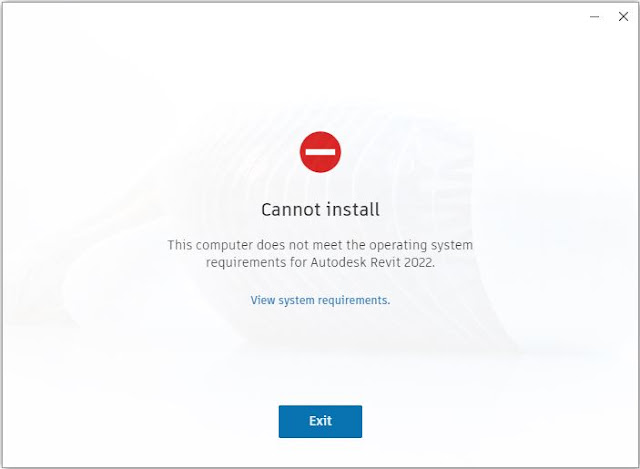
Not only did Autodesk cease to support Windows 7 but they actively prevented me from installing Revit 2022.

Well, I knew it was going to happen some day - in fact I was surprised to be able to keep Windows 7 running for so many years.

Time to bite the bullet and upgrade.  In the end, I decided that it was also time for a new laptop - and it would be simpler to buy a new Windows 10 computer to install and run Revit 2022 and later versions.

For the record, I still don't like Windows 10 even after becoming quite accustomed to it over the months.   Perhaps I should skip it and upgrade to Windows 11, now that Autodesk support running Revit on 11 . . . . . . ?

Surely Windows 11 has to be better than 10?  Hmmm, Microsoft do not have a good record on consistently improving their software over the years - although they have made a number of improvements , with occasional good milestone versions:

  • Windows 3 was a huge improvement on MsDos -  oops, should I be admitting to remembering that transition?
  • There were several different versions for home users and networks of varying degrees of success and confusion . . . (95, 98, 2000, NT etc)
  • Windows 7 finally brought them all together in one solid version.
  • And then Microsoft started trying to make Windows more like hand-held device operating systems - and we have a half-baked mongrel OS that is neither a serious work platform nor a simple user-friendly UI.

Oh well, I lost the battle - but it was fun while it lasted.


Saturday, 27 February 2016

Windows 7 to 10 upgrade?

I normally post exclusively about Revit issues, but this one relates only tenuously to Revit . . .

Andy Milburn recently posted about confusion, and mentioned he had taken the risk to upgrade to Windows 10.  I have heard varied accounts of problems with running Revit on Windows 10, although Andy only seems to have run into issues with the QAT in Revit.  Either way I have avoided the upgrade despite the insistent haranguing by Microsoft with its pop-up messages, often stating how many people have already upgraded (poor deluded people).

I recently acquired a small laptop for travelling, which came loaded with Windows 10.  Oh boy am  happy that I never upgraded my work computer from Windows 7.  It may well be a different story to move from Windows 8/8.1 to 10 - quite possibly 10 is an improvement over 8.1?  But so far I cannot see a single reason that Windows 10 would be better than Windows 7, especially in a large organisation.  All I can see is Microsoft taking away more control from me as a user, and hiding nasty little surprises in default settings, that you have to discover, then figure out how to disable.  One example relates to downloading photos:
The default image handling software is the new 'Photos App', which has a few extra features compared to previous offerings, but mostly it does stuff I don't like - such as automatically "enhancing" photos when downloading them, without even telling you, let alone asking.  OK, you can disable that feature, but it requires IT gymnastics to make 'Windows Photo Viewer' your default program if that is what you want to do (perhaps you miss the ability to zoom with a scroll wheel, for example).  Who knows how many other similar 'features' lie hidden in Windows 10?

Microsoft inserted the automatic upgrade messages into earlier Windows versions by stealth, using "security updates".  Let us hope that Autodesk does not follow their lead and force us into upgrading our Revit versions when we don't want to!  Oops, it is too late, they already did it to us - that cheeky little program "Autodesk Application Manager" does some minor updates with only a minimal prompt for users, whether the BIM Manager wants it or not.  As for the major upgrades,  what with their onerous, inflexible licensing systems and lack of backward compatibility, we have no choice but to upgrade with almost every version - either that or never collaborate with any other Revit users.