
The storage has to be calculated by volume per apartment - this means that we have to create schedules that combine the storage cupboards in apartments with the cages in the basement. Thus we need to create objects of different shapes and sizes in the model.
There are several ways to calculate the volumes from these objects, but surely the simplest way would be to use Revit's automatic volume calculation properties?
System Volume Property
You would think that Revit would be able to report back the volume of any object in your model. It is a database, right?It turns out that it can do so, to a very limited extent - and of course that leads to restrictions and frustrations.
It seems that only cetain category objects can report their volume, and then there may be further restrictions on scheduling or tagging:
By Category
- Many of the system families do have a "Volume" property


- But you would not want to create storage cages or cupboards by mis-using those categories? No, you would not!
- Logically you would use the Casework category for cupboards - but sadly that category does not have a volume property.
- The same applies for most loadable family categories.

- You could use the Mass category, but that is not sensible either, because that should be reserved for creating building massing models - if you start mis-using that category it will surely make life difficult (not least with visibility issues).

- Rooms do have volume properties, although that can depend on project settings - see below.
- Rooms are also not an ideal way to model such things as high-level storage cupboards!

- That leaves us with one last option (that I know of): the Generic category.
- For many years in Revit, generic families did report a Volume property (automatically calculated from the volume of all solid objects in the family).
- However, it was not originally possible to schedule this property
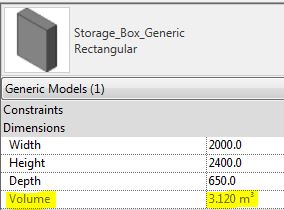
- In Revit 2014, Autodesk enabled the ability to schedule this Volume property.
- This was one of my few successes with lobbying Autodesk to include one small new feature in Revit, that would make a big difference to us.
- Sadly they ignored my pleas to also enable this property to be tagged.
Generic Families
Prior to v2014, we created a range of storage families that did the volume calculations as formulas within the families - so that we could schedule and tag the volumes.When it comes to basement storage cages, the shapes often become quite complex as they have to wrap around columns or need angled sides.

This led to some quite complex formulas that needed to take into account optional cutouts to the shapes, and to allow for overlapping cutouts.

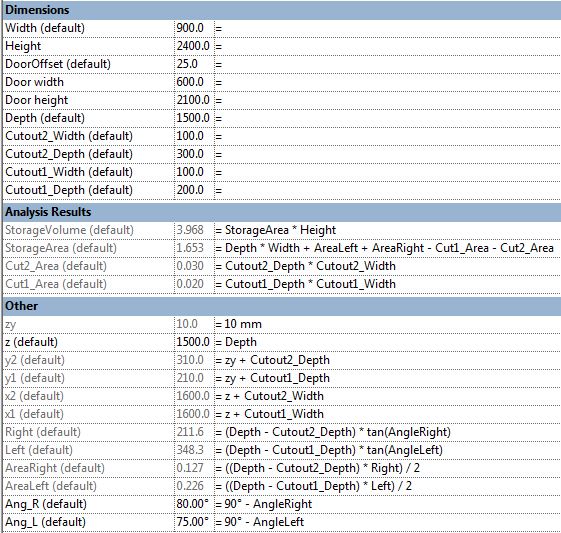

Fortunately all these calculations became redundant with v2014, as we can now use the system calculated "Volume" parameter to schedule storage volumes.
Except . . . . . When a project requires the storage to be tagged on drawings.
Room Volumes
Rooms do have the ability to calculate and report their volume, and it may be easier to create basement storage cages as rooms with cage walls to enclose them. This would allow any shaped area without having to create a range of families.
However, this becomes problemmatic when you need to create one schedule that combines the basement storage cages (Rooms) with in apartment storage cupboards (Generic category families).
Room volume calculations also have some quirks, that depend on project-wide settings:
- Rooms have a height property - this is used for the system calculated volume.
- However, it will not work if Rooms are set to only calculate Areas (not Volume)
- This project-wide setting is generally recommended as it makes the project performance noticeably faster - the menu even tells you that (and it is true)


- If you enable Areas and Volume calculation you will get the volumes being reported, but a slower project.
- If you need to do this anyway, then it is no extra overhead for calculating room storage.


Room Volumes are calculated at Wall Finish, regardless of the Room Area settings.
- This can be complicated if you need room areas to be calculated to wall centrelines.
- More on this in another blog post . . . .


