BILT Speaker

BILT Speaker
RevitCat - Revit Consultant

Monday, 28 May 2012

RTC 2012 Australasia - report

Just returned from the 2012 Australasian Revit Technology Conference, which was held on May 24-26th 2012 in Wollongong, NSW, Australia.   Thanks to Wesley Benn and all the organising team for putting on another great Revit conference.

I love the way that RTC always keeps going at the highest quality right up to the last few minutes - not only did we get to see some amazing gadgets in the afternoon (Wesley had the audience ducking for cover with a live demo of a quadrocopter), but the evening went on to a gala dinner, that included lots of fun and games.  So many other conferences tail off on the last afternoon with many people leaving early - such an anti-climax.  But not so with RTC, which is great value for money.

Although RTC is for users, and is run by Revit users, it was great to see some heavyweight Autodesk presence contributing to the conference:
Presentations by Anthony Hauck (Revit Product Line Manager) and Ken Marsh (Revit Structure QA Analyst); and an introduction by Rob Malkin (Director Autodesk AEC Asia Pacific).

There were a lot of interesting presentations including quite a number from overseas speakers, including some fun but informative Lab sessions with Marcello Sgambelluri.   There were quite a number of sessions where people described their (positive) experiences of linking Revit to external databases & Excel - in previous years this has been mostly speculation about the possibilities, but now it is well and truly happening. I certainly learned a lot from this conference, and look forward to the next one in Atlanta in June.


Short videos from my "Divide & Conquer" presentation


Sunday, 22 April 2012

Revit 2013 New Divide & Repeat Tools @ RTC 2012

Are you going to RTC 2012?  Both Revit Technology Conferences promise to be better than ever this year - interesting new venues and a wide range of speakers on all things Revit and BIM.  I am lucky enough to be presenting at both conferences:

"Divide & Conquer Adaptive Components" by Tim Waldock
on 25th May 2012 at RTC Australasia - Wollongong, near Sydney
on 30th June 2012 at RTC USA - Stone Mountain, Atlanta, Georgia


This presentation will look in detail at the new Revit v2013 features “Divide Path” & “Repeat”, particularly as they are used in adaptive components.  It will build on my RTC 2011 presentation "Designing in Revit Using Parametric Formulas" – which looked at repetitive patterns in design.  It will show how the new techniques can be used to achieve similar results in a different, but more flexible fashion.

This presentation will also look at the use of adaptive components within projects, again using the new techniques, to generate curved shapes, and also at repetition on or within those shapes, thus creating organic architectural models


We will look at the process of creating adaptive component families:
  • New “Divide Path” & “Repeat” features of Revit 2013 will be explained and demonstrated in great detail – including some limitations.  Practical examples of their use will also be demonstrated.
 
  • There will be a focus on creating curvilinear geometry and organic shaped Revit models, but in a systematic way that would aim to make the buildings more constructable. 
 
Space Planning Repeaters

  • Some of the adaptive components will use complex rule-based parametric formulas to drive iterative design. 
  • Will involve some trigonometry and other mathematical formulas, including error checking.


  • APIs will not be used.
 See you at RTC . . . .

    Sunday, 15 April 2012

    Escape Path / Egress Travel Distance Component

    It is common for architects to need to calculate, check and record escape paths or egress travel distances in a building design.  Revit does not have an inbuilt method for doing this.   I've seen many suggestions on how to do this in Revit, but they are all pretty clunky, mostly involving several components and tags and schedules. 
    In Revit 2012, there was a new way to do this using adaptive components.  I did not publicise this before, because there was a bug in the software that prevented it from working 100% reliably - but in Revit 2013, that bug has been fixed, so here is how to do it:

    This method will create a 2D travel path (calculating distances in plan only).

    1. Create a new adaptive component (use "Generic Model Adaptive" template)
    2. Place a point on the intersection of the two reference planes;
    3. Place another three points in a line along the X axis, and 
    4. Make all the points adaptive
    5. In Object Styles, make a new subcategory called "Escape Path", with a suitable linestyle – say red, dashed, heavy lineweight.  Ensure that you choose the right category to put it under (generic, if that is your family category) – as all categories are listed.
    6. Draw a line between points one and two, using 3D snapping.

    7. Change the line to the Escape Path subcategory.
    8. Join points 2 & 3 with a similar line, then points 3 & 4.
    9. Place a dimension between points 1 and 2, using the Ref. level as your work plane – this will give you horizontal measurements in plan.  NB. Be sure to attach the dimensions to the actual points (not line ends) otherwise the reporting parameters will not allow you to use them in formulas.
    10. Select the dimension, give it a parameter “Plan_Length_1”
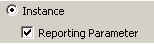
    11. This must be set as an instance & reporting parameter
    12.  Repeat this process between points 2 & 3, then points 3 & 4.
    13.  Flex the component by moving each point; NB. do not click and drag (it will move in z direction) - use the arrows
    14. Create a new Instance length parameter called “Total plan escape distance” 
    15. Give it a formula: “Plan_length_1 + Plan_length_2 + Plan_length_3
    16.  Tick the “Always Vertical”  family parameter – this will ensure that measurements are always true in plan (they can be slightly out if you don’t tick this).
    17. Save and load the family into a project; and it should prompt for 4 points when placed.
    18. Once placed it should report back the total escape path length, in its instance properties.
     To make this component more useful you could add some more checks and controls:

    •  A counter (integer parameter) for the number of segments, using visibility to hide unwanted segments and calculations to remove them from the total; When placed in the project, it will still require all the adaptive points to be place, but it will just ignore anything after the required number in the counter.
    •  A user defined parameter for maximum allowable length;
    •  A calculation to see if the total length exceeds the maximum;
    • A warning if the maximum is exceeded – this could either be a change of colour in the lines, or else an element that is normally hidden, but has its visibility turned on if the total length exceeds the maximum.  NB. If you want a text warning, it has to be done as model text nested in a generic component loaded into the adaptive family.

       
    • This example only has 4 segments, but you could add more - of course then you'd need more visibility and calculation parameters.
    • You could also create a version that measures distances in 3 dimensions.  To do that you need to host the reporting parameter lengths on reference lines drawn between each adaptive point - this would then measure the diagonal distance if any of the adaptive points are moved up in the Z direction.
    • If you make the Total distance a shared parameter, then you should be able to schedule and tag it.
    Warning:  In order to avoid the v2012 bug, you must start with a v2013 family template.  It will not fix the bug if you start from a v2012 template and upgrade it.

    Please use this technique at your own risk - it is entirely up to you to check that it all works properly, and that it meets your local standards for egress travel distance / escape path measurement.  Revitcat accepts no liability whatsoever for the creation and use of this technique.  For this reason it is not possible to post a copy of this component here, so you need to create it yourself from scratch from a v2013 adaptive family template.

    Youtube demo of escape path component in use

    Saturday, 31 March 2012

    Revit 2013 New Stair Tool @ RTC 2012


    One of the big new features of Revit Architecture 2013 is the new component based Stair tool.  Although it is advertised as new 'Stair and Railing' tools, the reality is that the railings part of it is at this stage only a minor change to the existing functionality.  The stairs however, are radically different in approach, so we will all have to learn a completely new methodology.  I have done a lot of testing over the last few months, and have figured out some of the best ways to work with the new tool.  I will be doing a presentation on this at the Revit Technology Conference (Australasia) in Wollongong, just south of Sydney on 26 May 2012.

    You could just look at the Revit wiki help files, but they don't really tell you how best to tackle modifying stairs or handling the annotation.  The whole process is not easy to just figure out on your own, because it is a whole lot more complicated than the old simple sketch tool - the downside of having a new tool that does more, and gives so much more control!

    New Stairs:
    We will briefly go through the different ways to create stairs in Revit
    Creating New Stairs

    Modification:
    We'll go into a lot more detail on modifying them in various situations without getting undesired results.
    The new shape handles seem simple at first, but they have all kinds of different effects on the stairs depending on the situation.  They may not always be the best option for modifying stairs.
    Stair Shape Handles

    Annotation:
    We'll look at the new stair numbering feature and ways to control the stair path arrows.


    Stair Numbering


    Visibility Control:
    We now have a lot more control over how stairs and stair annotation looks, but this adds a layer of complexity, and will require some additional up front setup work with view templates.
    New Stair Subcategories


    Handout:
    At the end of the presentation you will get a comprehensive handout that documents the presentation in detail, and gives you all kinds of tips and tricks on using the new stair tool.

    To learn more about other new features in Revit 2013, go to David Light's blog.