BILT Speaker

BILT Speaker
RevitCat - Revit Consultant
Showing posts with label revision. Show all posts

Tuesday, 25 January 2022

They Broke Their Own Cloud Space in Revit 2022

Way back in Revit 2015, Autodesk gave us a really nice enhancement:

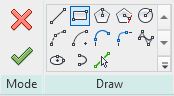
  • Ability to use all the sketch line drawing tools to quickly create Revision Clouds.


Prior to v2015 we had to laboriously draw each arc of the cloud as a segment (2 clicks:  for start and end of the arc) - the longer the segment, the larger the arc radius.  For those who never experienced it, that was a really tedious workflow.

I remember from Beta testing that we requested for the Rectangle to be the default drawing tool (it was not initially - I think the original default was either the line or circle.  Luckily we asked for that request before the code was finished so it was quickly implemented.

One of the other little features they added was the ability to reverse the direction of the cloud using the space bar - as it was being drawn:


This allowed the user to create a reverse or inside-out cloud - it may look ugly but it has a very specific use:  To indicate "Hold" on part of the drawing or model.
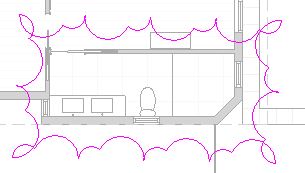
They Broke it in 2022

I am not sure if it happened in v2022 or 2022.1, but the spacebar trick no longer works for placing rectangular reverse clouds.   Aaaargh.

It still works for circles and both polygon types.

That means you could use a 4 sided polygon to get a square cloud - but the chances of needing that shape are slim.  The only other option is to use the line tool and create a rectangle by drawing the 4 sides in an anti-clockwise direction.

The good news is that it is still waaaay better than the old method pre-v2015.

Let's hope that Autodesk fix this in the next update?


Thanks to Frank Crisp of Koichi Takada Architects in Sydney for pointing this out to me.


Thursday, 7 June 2012

Revit TV Drawing Manager

We have been using Revit TV Drawing Manager for a couple of years now.  It is a great Revit add-in that you can use to manage drawing sheets and revisions in a much more systematic way than the inbuilt Revit revisioning tool.  It has tools for things like batch renaming and revision updates.  Not only can it help you with managing huge numbers of drawings sheets on multiple linked files, but it also handles transmittals and the creation and automatic naming of batch export files (PDF, DWG, DWF etc) - it can generate file names to match the most complex conventions required.

RTV Drawing Manager works by using an external SQL database which holds all the sheet, revision, transmittal & contact data - this is then synchronised with the Revit file to generate actual revision notes on the sheets.

We have written a comprehensive series of help files for inhouse use.  These are now available to anyone who is interested in using RTV Drawing Manager - they are hosted on the RUGSyd website (Revit User Group Sydney) at:
Revit TV Help Files v2011
These help files were written for Revit v2011, so they don't show all the latest features, but should give you a pretty good idea of its capability:


Edit Multiple Sheets - allows you to add revisions to multiple drawings by several methods, including auto-incrementing each revision, when they may be different